> ## Documentation Index
> Fetch the complete documentation index at: https://portkey-docs-chore-v2-11-2.mintlify.site/llms.txt
> Use this file to discover all available pages before exploring further.
# Overview
> Portkey helps bring your agents to production












 ## Integrate Portkey with your agents with just 2 lines of code
```py Langchain theme={null}
from langchain_openai import ChatOpenAI
from portkey_ai import createHeaders, PORTKEY_GATEWAY_URL
llm = ChatOpenAI(
api_key="OpenAI_API_Key",
base_url=PORTKEY_GATEWAY_URL,
default_headers=createHeaders(
provider="openai", #choose your provider
api_key="PORTKEY_API_KEY"
)
)
```
### Get Started with Portkey x Agent Cookbooks
* [Autogen](https://dub.sh/Autogen-docs)
* [CrewAI](https://git.new/crewAI-docs)
* [Phidata](https://dub.sh/Phidata-docs)
* [Llama Index ](https://git.new/llama-agents)
* [Control Flow](https://dub.sh/Control-Flow-docs)
***
## Key Production Features
By routing your agent's requests through Portkey, you make your agents production-grade with the following features.
### 1. [Interoperability](/product/ai-gateway/universal-api)
Easily switch between LLM providers. Call various LLMs such as Anthropic, Gemini, Mistral, Azure OpenAI, Google Vertex AI, AWS Bedrock and much more by simply changing the `provider ` and `API key` in the LLM object.
### 2. [Caching](/product/ai-gateway/cache-simple-and-semantic)
Improve performance and reduce costs on your Agent's LLM calls by storing past responses in the Portkey cache. Choose between Simple and Semantic cache modes in your Portkey's gateway config.
```json theme={null}
{
"cache": {
"mode": "semantic" // Choose between "simple" or "semantic"
}
}
```
### 3. [Reliability](/product/ai-gateway)
Set up **fallbacks** between different LLMs or providers, **load balance** your requests across multiple instances or API keys, set **automatic retries**, and **request timeouts.** Ensure your agents' resilience with advanced reliability features.
```json theme={null}
{
"retry": {
"attempts": 5
},
"strategy": {
"mode": "loadbalance" // Choose between "loadbalance" or "fallback"
},
"targets": [
{
"provider": "openai",
"api_key": "OpenAI_API_Key"
},
{
"provider": "anthropic",
"api_key": "Anthropic_API_Key"
}
]
}
```
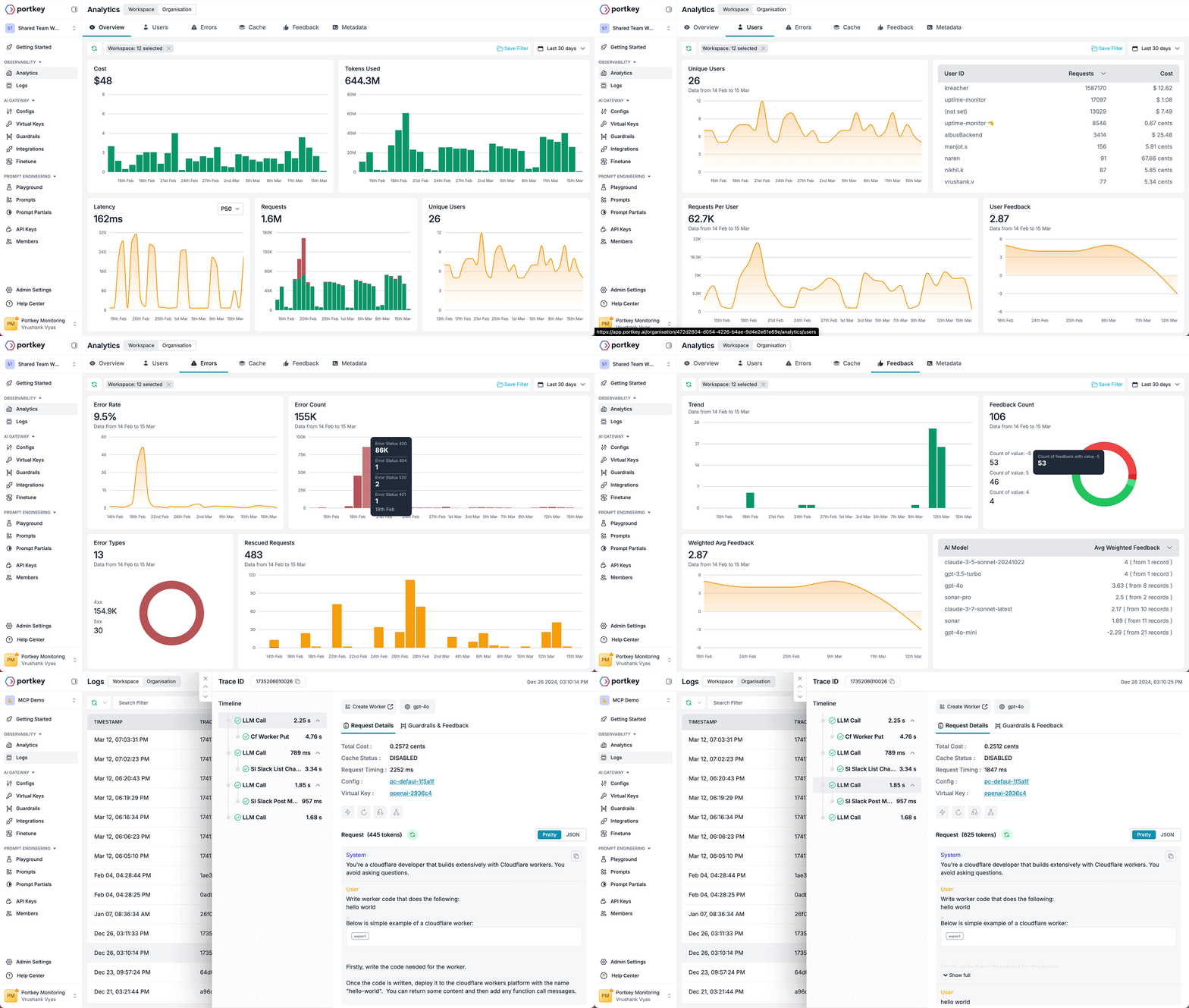
### 4. [Observability](/product/observability)
Portkey automatically logs key details about your agent runs, including cost, tokens used, response time, etc. For agent-specific observability, add Trace IDs to the request headers for each agent. This enables filtering analytics by Trace IDs, ensuring deeper monitoring and analysis.
### 5. [Logs](/product/observability/logs)
Access a dedicated section to view records of action executions, including parameters, outcomes, and errors. Filter logs of your agent run based on multiple parameters such as trace ID, model, tokens used, metadata, etc.
## Integrate Portkey with your agents with just 2 lines of code
```py Langchain theme={null}
from langchain_openai import ChatOpenAI
from portkey_ai import createHeaders, PORTKEY_GATEWAY_URL
llm = ChatOpenAI(
api_key="OpenAI_API_Key",
base_url=PORTKEY_GATEWAY_URL,
default_headers=createHeaders(
provider="openai", #choose your provider
api_key="PORTKEY_API_KEY"
)
)
```
### Get Started with Portkey x Agent Cookbooks
* [Autogen](https://dub.sh/Autogen-docs)
* [CrewAI](https://git.new/crewAI-docs)
* [Phidata](https://dub.sh/Phidata-docs)
* [Llama Index ](https://git.new/llama-agents)
* [Control Flow](https://dub.sh/Control-Flow-docs)
***
## Key Production Features
By routing your agent's requests through Portkey, you make your agents production-grade with the following features.
### 1. [Interoperability](/product/ai-gateway/universal-api)
Easily switch between LLM providers. Call various LLMs such as Anthropic, Gemini, Mistral, Azure OpenAI, Google Vertex AI, AWS Bedrock and much more by simply changing the `provider ` and `API key` in the LLM object.
### 2. [Caching](/product/ai-gateway/cache-simple-and-semantic)
Improve performance and reduce costs on your Agent's LLM calls by storing past responses in the Portkey cache. Choose between Simple and Semantic cache modes in your Portkey's gateway config.
```json theme={null}
{
"cache": {
"mode": "semantic" // Choose between "simple" or "semantic"
}
}
```
### 3. [Reliability](/product/ai-gateway)
Set up **fallbacks** between different LLMs or providers, **load balance** your requests across multiple instances or API keys, set **automatic retries**, and **request timeouts.** Ensure your agents' resilience with advanced reliability features.
```json theme={null}
{
"retry": {
"attempts": 5
},
"strategy": {
"mode": "loadbalance" // Choose between "loadbalance" or "fallback"
},
"targets": [
{
"provider": "openai",
"api_key": "OpenAI_API_Key"
},
{
"provider": "anthropic",
"api_key": "Anthropic_API_Key"
}
]
}
```
### 4. [Observability](/product/observability)
Portkey automatically logs key details about your agent runs, including cost, tokens used, response time, etc. For agent-specific observability, add Trace IDs to the request headers for each agent. This enables filtering analytics by Trace IDs, ensuring deeper monitoring and analysis.
### 5. [Logs](/product/observability/logs)
Access a dedicated section to view records of action executions, including parameters, outcomes, and errors. Filter logs of your agent run based on multiple parameters such as trace ID, model, tokens used, metadata, etc.
 ### 6. [Prompt Management](/product/prompt-library)
Use Portkey as a centralized hub to store, version, and experiment with your agent's prompts across multiple LLMs. Easily modify your prompts and run A/B tests without worrying about the breaking prod.
### 7. [Continuous Improvement](/product/observability/feedback)
Improve your Agent runs by capturing qualitative & quantitative user feedback on your requests, and then using that feedback to make your prompts AND LLMs themselves better.
### 8. [Security & Compliance](/product/enterprise-offering/security-portkey)
Set budget limits on provider API keys and implement fine-grained user roles and permissions for both the app and the Portkey APIs.
### 6. [Prompt Management](/product/prompt-library)
Use Portkey as a centralized hub to store, version, and experiment with your agent's prompts across multiple LLMs. Easily modify your prompts and run A/B tests without worrying about the breaking prod.
### 7. [Continuous Improvement](/product/observability/feedback)
Improve your Agent runs by capturing qualitative & quantitative user feedback on your requests, and then using that feedback to make your prompts AND LLMs themselves better.
### 8. [Security & Compliance](/product/enterprise-offering/security-portkey)
Set budget limits on provider API keys and implement fine-grained user roles and permissions for both the app and the Portkey APIs.